AI drafts, you decide

Organize Claude, Codex and DeepSeek into a small team that carries a real, weeks-long project for you. The project is kept in one shared ledger, so you can switch sessions or models and carry on. You do three things: set the goal, approve the plan, and make the call when it matters.

Prefer a story? Start the demo, "The Wanli Reforms", at Chapter 1 →

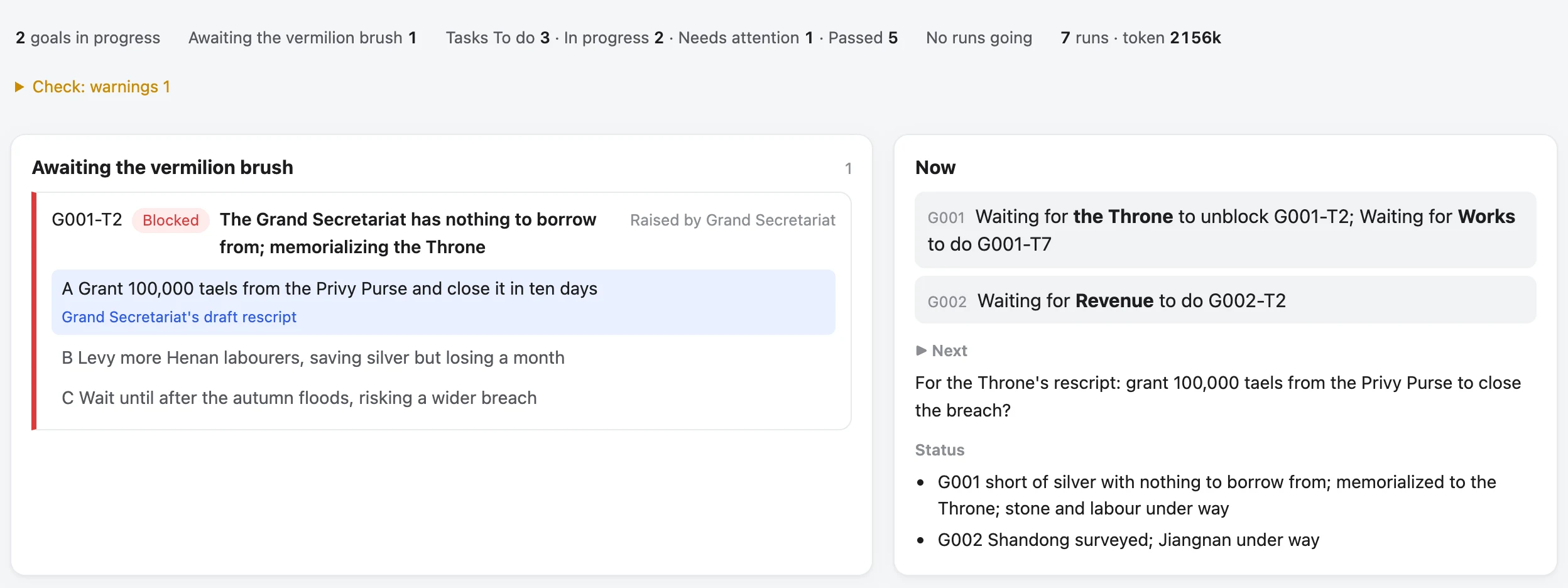
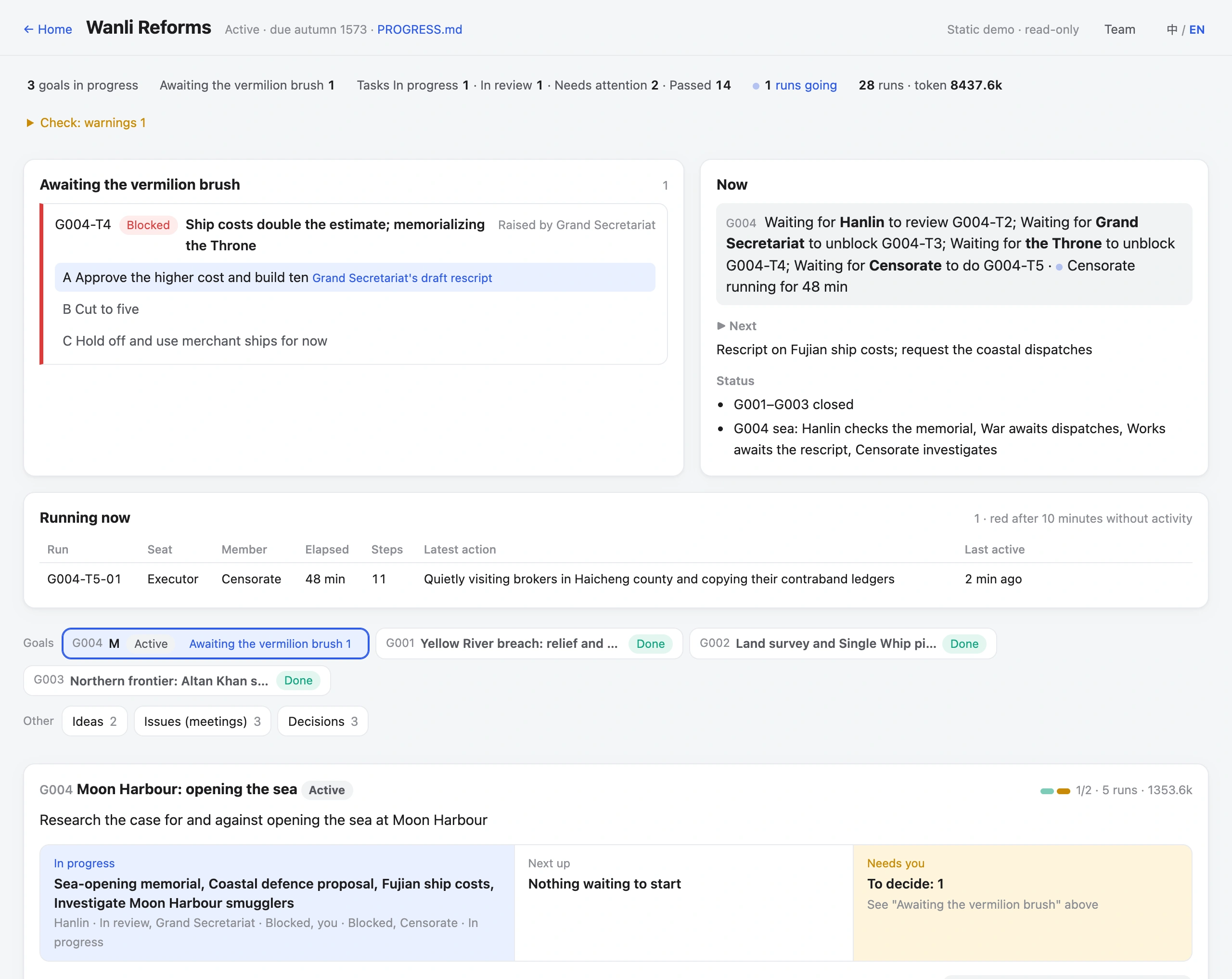
The demo board at the final chapter: a memorial on ship costs awaiting the vermilion brush, the Now panel, a run in progress and four affairs of state

One screen: what needs your decision, who is doing what, and which runs are going

01Why

Claude and Codex manage conversations. Vermilion manages the work.

Use Claude or Codex directly to push a weeks-long project and you soon become the messenger. Putting several models in a group chat is no different: they all read the same ever-longer transcript, and nobody keeps the books.

Relay

Copying between windows

One model writes the plan, you paste it to another to write the code, then paste the result back for review.

Amnesia

Explaining it all again

A new session means retelling the background. What you settled yesterday is gone today.

Self-grading

"Done," says the doer

The same model plans, builds and signs off. Nobody else ever looks.

The models are strong enough. The problem is structure: they are organized as project → conversations; Vermilion is project → goals → tasks. In Claude or Codex, a project is a string of ever-longer chats. In Vermilion it is a tree of goals and tasks, and every card has someone doing it, someone checking it, and a state.

Claude / Codexproject → conversations
  • My project
  • 💬 Help me plan a login feature
  • 💬 Write the code for this plan (copied from the last chat)
  • 💬 Let's pick up from yesterday… (background retold)
  • 💬 Can you check it for problems again?
  • 💬 …

Conclusions are scattered across chat logs. Who did what, how far it got, and what's waiting on you: only you remember.

vs
Vermilionproject → goals → tasks
  • My project
  • G001 Ship login Approved
  • T1 Plan Claude does · Codex reviews Passed
  • T2 Code Codex does · Claude checks In progress
  • T3 End-to-end check DeepSeek checks Not started
  • G002 Redesign home page Awaiting approval

Every card says what's wanted, who does it, who checks it and how far it got. Switch models or sessions and work picks up from "▶ Next".

Claude / Codex directlyWith Vermilion
Unit of workA conversationA goal, split into task cards
Planning and staffingHow to split it and who gets what is all on youThe Lead builds the plan and picks members by capability; you approve once and work starts
WorkspaceOutput scattered in chats, drafts mixed with finished workcollab/ is the ledger, work/ holds results: one delivery per task, one desk per member
ContextStuck in chat history, retold every session; in a group chat everyone reads everythingKept in the project's collab/; each member gets their own slice for their seat, and work picks up from "▶ Next"
Several models togetherYou copy and paste between windowsThe Lead dispatches; members work in their own CLIs; results are logged automatically
Who comes to youEvery model, after every stepThe Lead handles members and solves what the plan covers; only real blockers reach you, with options and a recommendation
Multi-model discussionYou ask each in turn and relay their answersMeetings: each speaks independently and reviews the plan, you rule, and the transcript is kept
Who says it's doneThe model that did itAnother model checks it against the success criteria and sends it back if it falls short
What you manageEvery stepThree things: approve the plan, decide "Needs your decision", confirm completion
Progress and costScroll through chatsThe board shows it at a glance: who's working, what's stuck, how many tokens
02Roles

An answer from four centuries ago

In Ming China, the Grand Secretariat drafted a response to each memorial on a slip of paper, and the Emperor only decided, in vermilion ink. The ministries carried it out; the censors checked. Vermilion gives AI assistants the same division of labour.

SeatMing courtWho sits thereWhat they do
OwnerThe Emperor's vermilion brushYouSet goals, approve plans, rule on "Needs your decision"
LeadGrand Secretariat draftsYour main assistant (e.g. Claude)Break down goals, design the flow, dispatch, integrate results
MembersThe Six MinistriesCodex, DeepSeek…Do tasks in their own native CLI
ReviewerSupervising secretariesA different modelCheck against the success criteria; send back what falls short

The roster records each model's tier and cost: hard work goes to strong models, tidying and lookups to cheap ones. Within a goal, members resume their earlier sessions where possible instead of starting from zero.

03Context

Chats scatter. The ledger stays.

Context belongs to the project, not to a conversation. Vermilion keeps the project in one ledger (collab/) that every model shares. When someone starts work they get only their own slice, and when they finish, their conclusions go back into the ledger. So you can close a chat or swap a model at any time and the work carries on.

Core structureplain local files, git-friendly
  • AGENTS.mdthe one set of instructions every assistant reads first
  • collab/the project ledger
  • PROGRESS.mdthe Lead's entry point: where things stand, "▶ Next", what's waiting on you
  • goals/what each goal needs, how we'll know it's done, the plan you approved
  • tasks/one card per task: what to do, what to hand in, who checks, how far along
  • decisions.mdwhat's been settled
  • internal/the event record: who handed in what and when; the board is drawn from it
  • work/deliverables; each member also has a scratch desk for drafts
Picking up

Progress lives in the ledger, not in chat

Each new Lead session starts from the "▶ Next" in PROGRESS. A card's status is generated from the event record, not typed by an AI. At the end of every turn a program checks the ledger and won't let it close if something's off. On rework, the member's original session is resumed.

Working apart

Own CLI, own session

Executor and reviewer each run in their own session. Deliverables go in a shared place and drafts on your own desk; whoever takes over reads only the deliverables and the record, never someone else's desk. Claude members are dispatched without your personal settings or auto-memory, and work from the slip alone.

Handing it over

One slip each, a few KB

The Lead reads only the entry point and looks up the rest on demand. At dispatch, a script puts just this run's slice into the starting instruction: goal, handoff, upstream deliveries, relevant decisions, the rules for your seat, and the commands you can use. Not the whole history. In a meeting, models called by the same prompt can't see each other's answers, and private input goes only to you.

VSee a real slipFrom the demo "The Wanli Reforms": what the Ministry of Revenue gets for "River strategy"Demo data
## Goal
G001 Yellow River breach: relief and repair
- What we want: Close the Xuzhou breach, reopen the Grand Canal, and get grain to the flood victims
- Success criteria: Breach closed before the autumn floods; grain barges moving again; relief grain handed out household by household
Proposal (read it before you start; the hard constraints are there): `collab/goals/G001/proposal.md`

## Handoff
- Purpose: Compare narrowing the channel against diverting the flow and settle the river strategy
- Deliverables: A strategy memorial with cost estimates for both options
- Acceptance criteria: Pros, cons, materials and time for both options, clear enough for court debate
(the other fields are blank this time, omitted)

## Where things stand
…You are Ministry of Revenue, acting as "Executor" this time.
Working directory `work/G001` (relative to the project root). Put deliverables in `work/G001/G001-T1/` by default… Keep drafts and working notes in your scratch space `work/G001/.scratch/Ministry of Revenue/G001-T1/` and only write your own; scratch is not evidence, and review looks only at deliverables.

## Rules
- Work from the context pack the dispatch script gives you. Don't read PROGRESS or the full protocol…
- Write "unknown" or "not verified" for uncertain results; never infer that something is done.
- Start from results: when you pick up someone else's task or a later stage, start only from the deliverables and the records in collab/; don't read other people's scratch space.

Excerpt from the actual output of flow.py --project demo/wanli-reforms context G001-T1 --for "Ministry of Revenue"; "…" marks omissions. The rules section is much longer in full. At dispatch, this slip is attached to the starting instruction handed to the member.

04Flow

How one piece of work gets done

From a one-line idea to sign-off and archive in eight steps, and you appear in only three. The Lead and members carry the rest and come to you only when they're stuck.

You
Lead
Members
1IdeaSay what you want in a line
2ProposalBig calls go to a meeting
3PlanTasks and who does them
4ApproveNo work before approval
5WorkMembers deliver into work/
6Cross-checkAnother model reviews; failures go back
Needs your decisionOnly when stuck, with options, costs and a recommendation
7ReportIntegrate results; goal goes up for sign-off
8ConfirmYou nod; it's archived

See a real approval: Chapter 1 →

05Cases

A real case: what happens when work gets stuck

Every image below is taken from the demo board. Click one to jump to that moment and explore it yourself.

1

Blocked, and the Grand Secretariat handles it

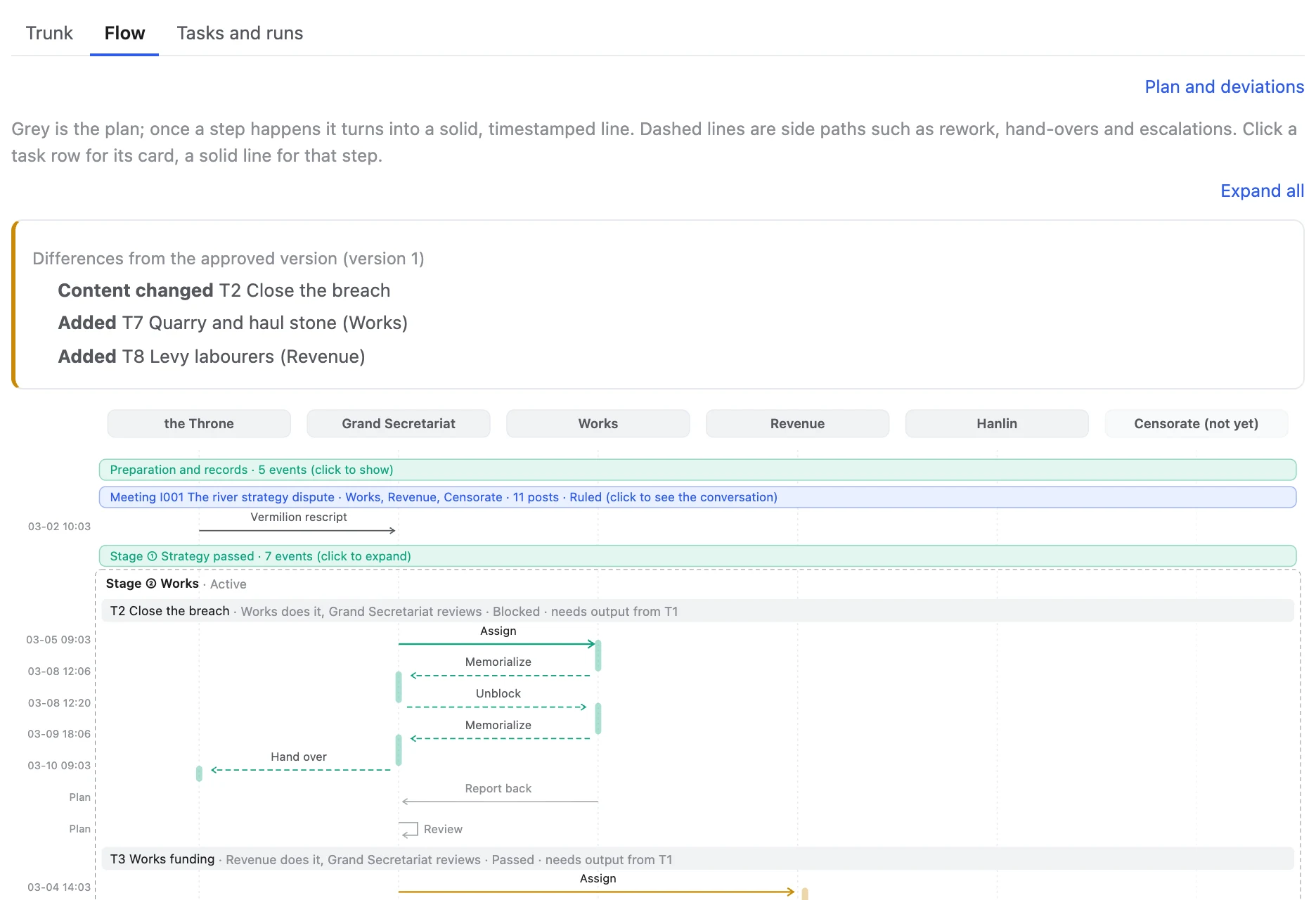
Works reports that closing the breach needs both stone and labourers, and it can only supply the stone. The Grand Secretariat sees this is within the plan and doesn't trouble the Throne: it splits the work into quarrying (Works) and levying labour (Revenue) in parallel, and the original task becomes pulling the two together. The flow chart marks how this differs from the approved version.

Chapter 3 · flow chart →
Blocked, and the Grand Secretariat handles it: Chapter 3 flow chart
2

Only what it can't solve comes to you

Then Works is 100,000 taels short and the Grand Secretariat has nowhere to borrow from, so it goes up to the Throne: three options, the cost of each, and the Secretariat's draft rescript. One stroke of vermilion and work continues.

Chapter 3 · awaiting the brush →
Only what it can't solve comes to you: Chapter 3, awaiting the vermilion brush
3

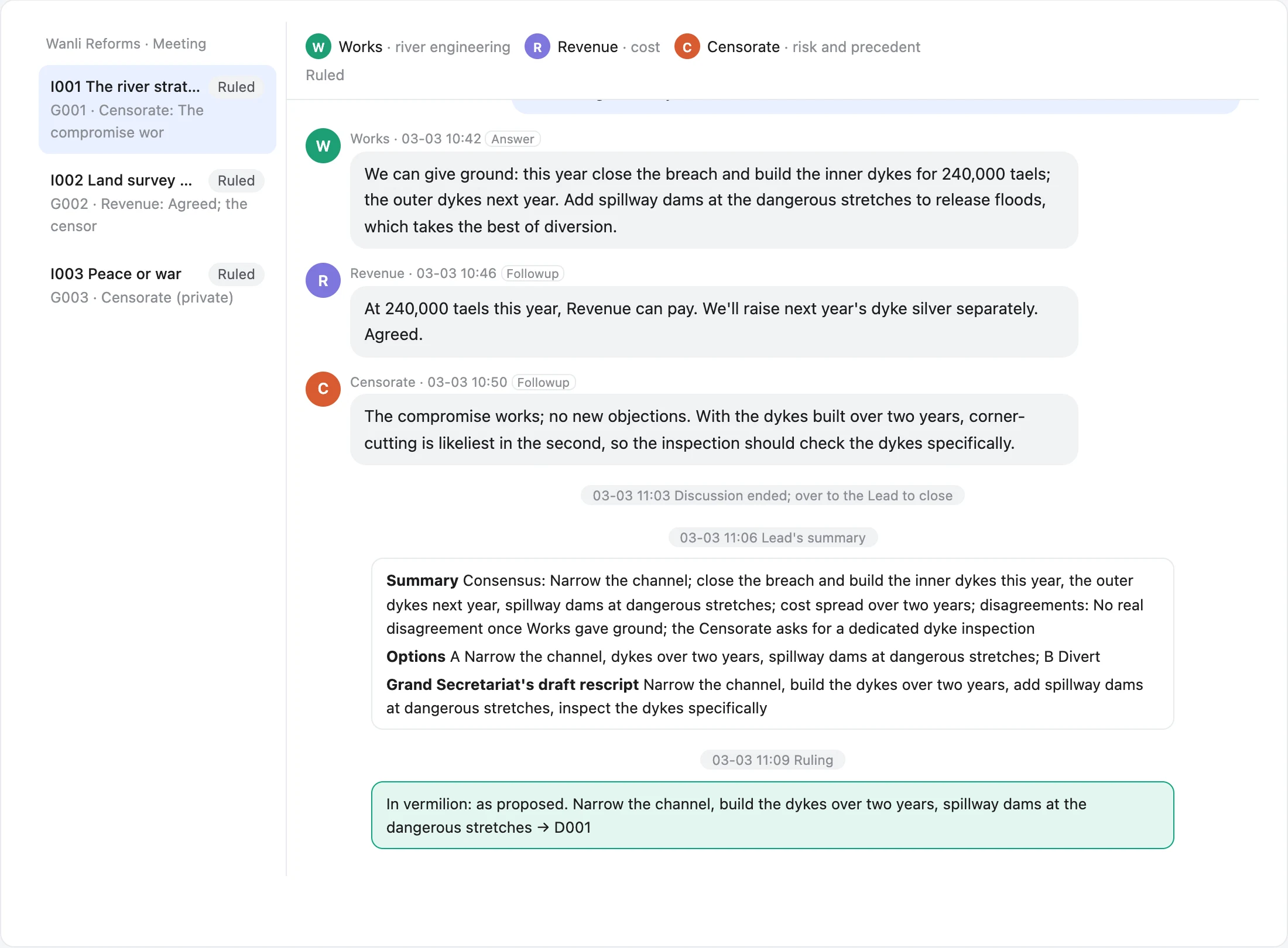
A meeting: three rounds from dispute to compromise

The river strategy dispute. Round one: Works, Revenue and the Censorate each state a position independently. Round two: they question each other; Revenue asks where the silver comes from, and Works brings up three diversions under Jiajing that all broke again. Round three: one follow-up question from you, and Works proposes building the dykes over two years. The Secretariat sums up and you rule.

Chapter 1 · meeting I001 →
A meeting: three rounds from dispute to compromise: Chapter 1, meeting I001
4

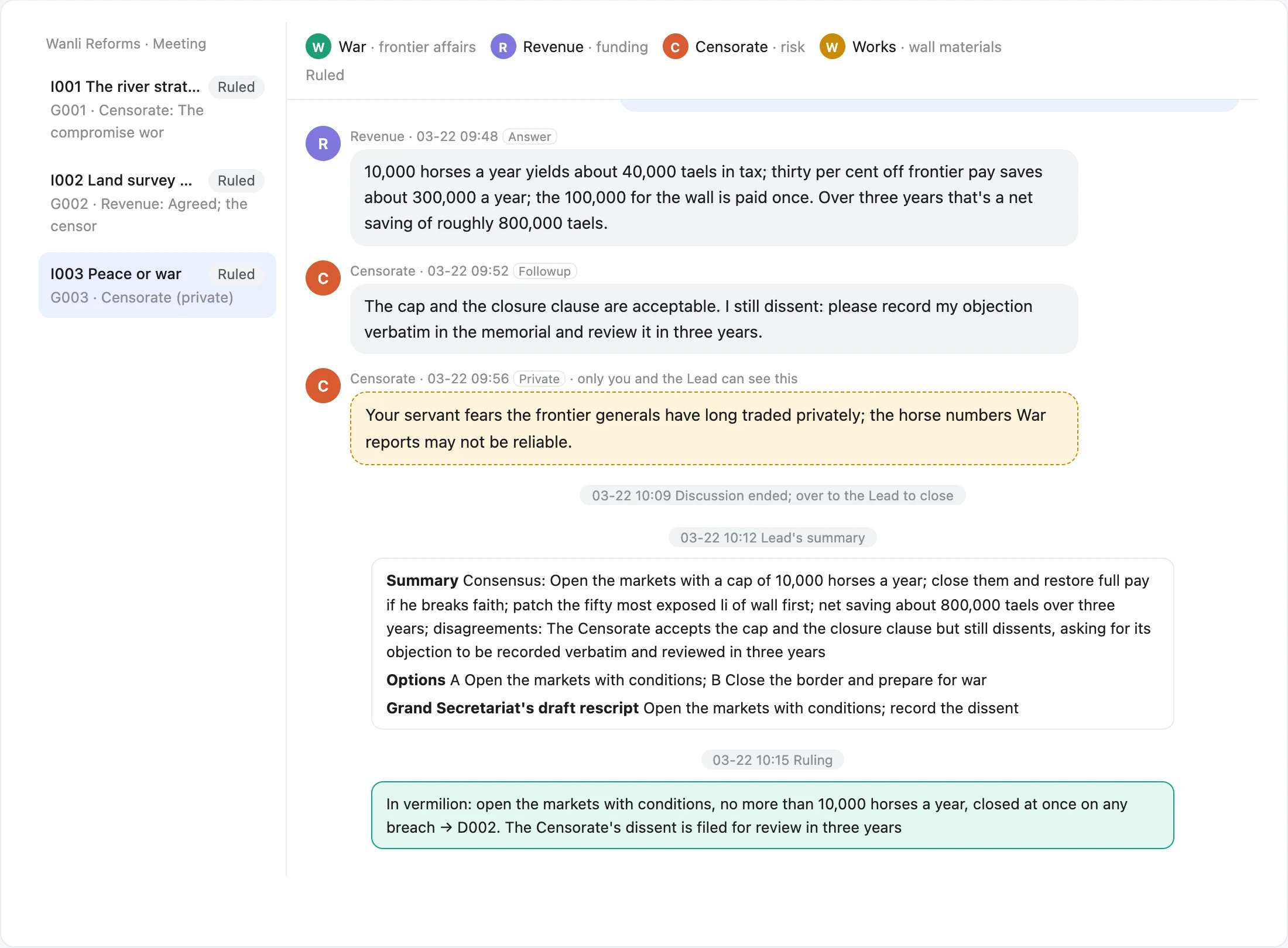
Dissent on record, and a private word just for you

War or peace with the Mongols. War revises its plan using Works' numbers, and Revenue works out the savings over three years. The Censorate accepts the limits but insists its dissent go into the memorial word for word, and privately warns that border generals have traded on the side for years, so the horse counts may not be reliable. Only you and the Grand Secretariat can see that note.

Chapter 5 · meeting I003 →
Dissent on record, and a private word just for you: Chapter 5, meeting I003
5

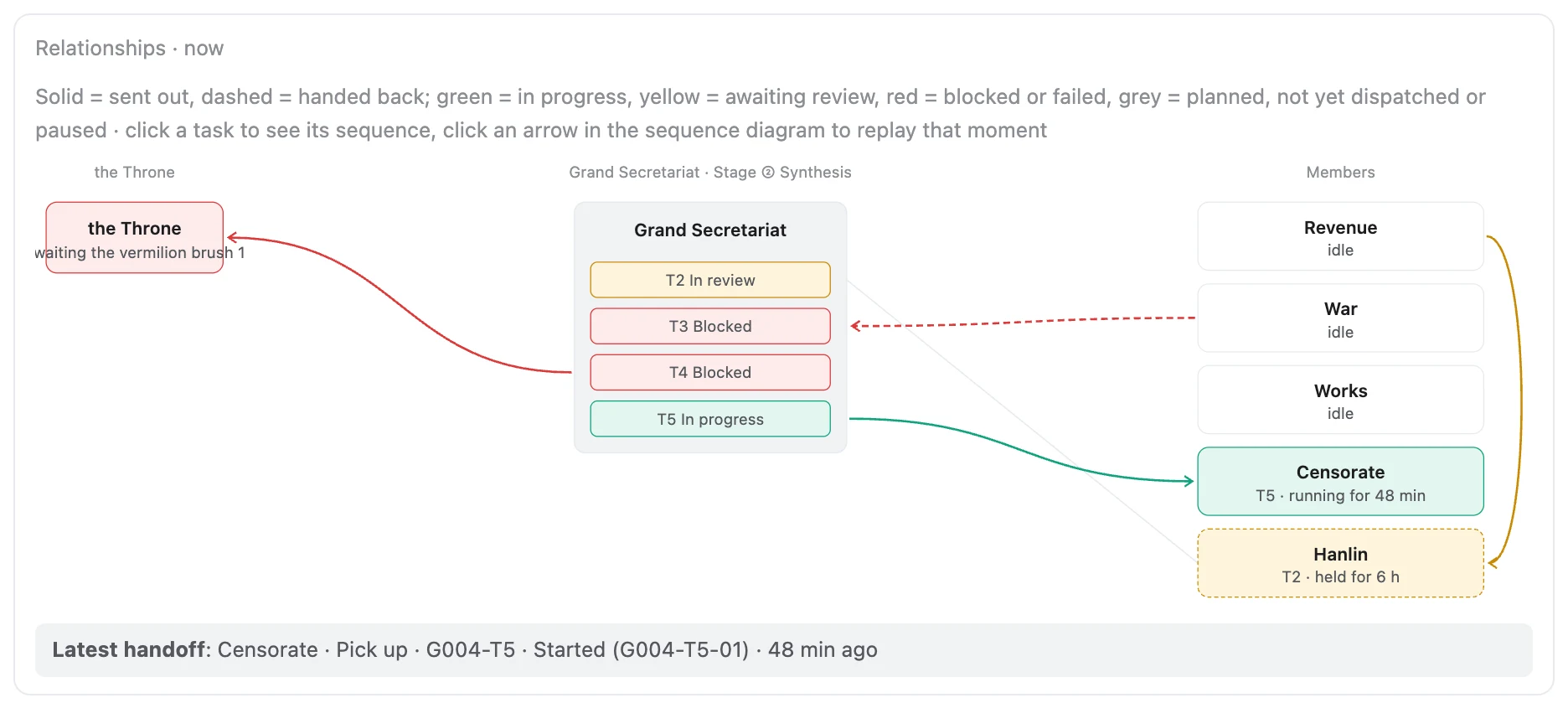
Who is doing what, at a glance

Five sea-opening tasks in parallel: Hanlin is reviewing Revenue's memorial, War and Works are blocked (the ship costs have gone up to you), and a Censorate run is going. Solid lines go out, dashed lines come back, and colour is state.

Final chapter · relationship map →
Who is doing what, at a glance: final chapter relationship map

06Features

What's inside

Every screen on the board is generated on the spot from the project's Markdown and event log. All screenshots below come from the demo; click through and try it yourself.

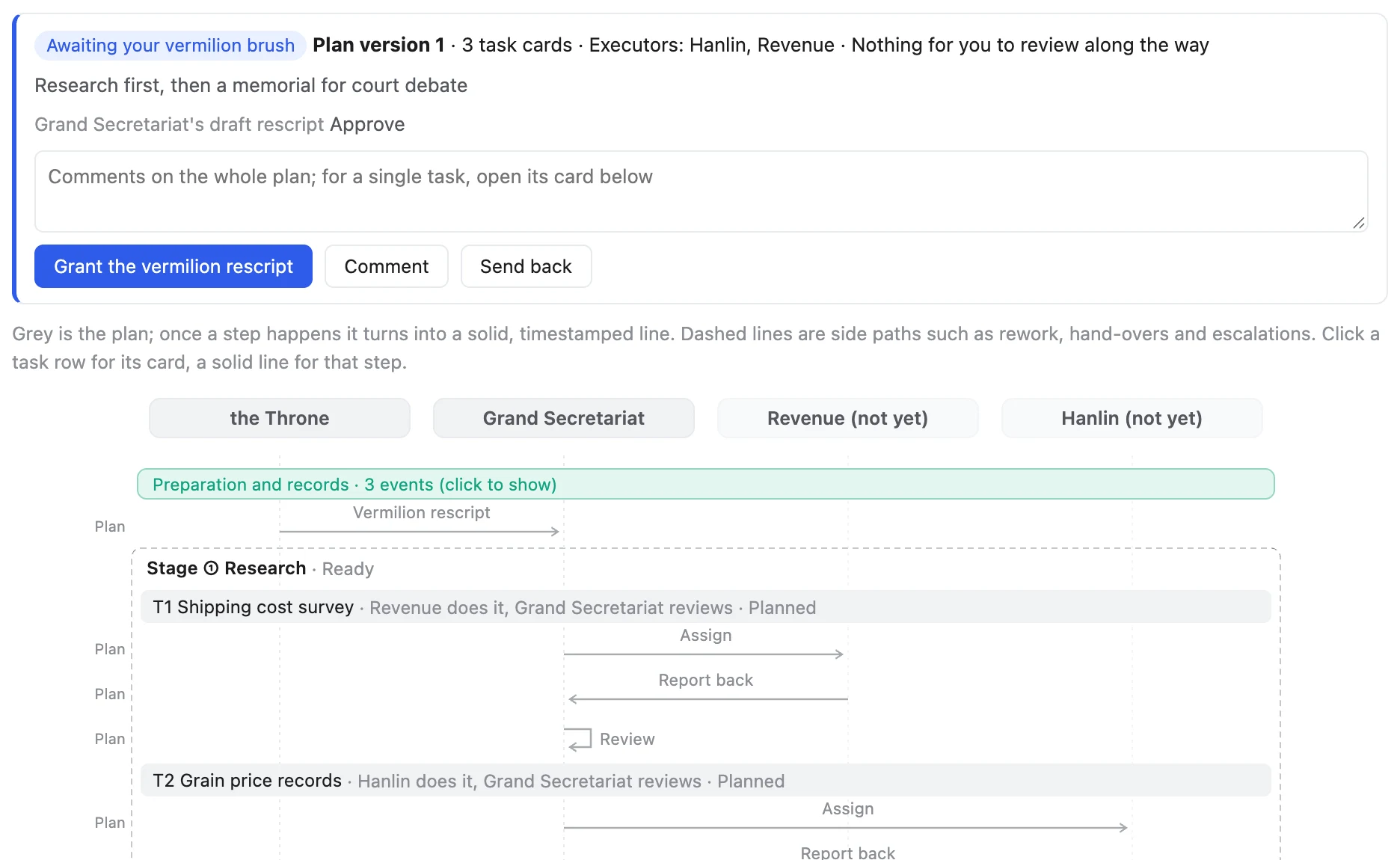
See the whole plan before you approve: from a local board

See the whole plan before you approve

Once a plan is submitted, the board shows it as one diagram: the stages, what runs in parallel, who does and who checks each task. Comment on the whole plan or on a single card, or send it back; work starts only when you click approve. The approved version is saved, and from then on the diagram marks where reality departs from it.

From a local board
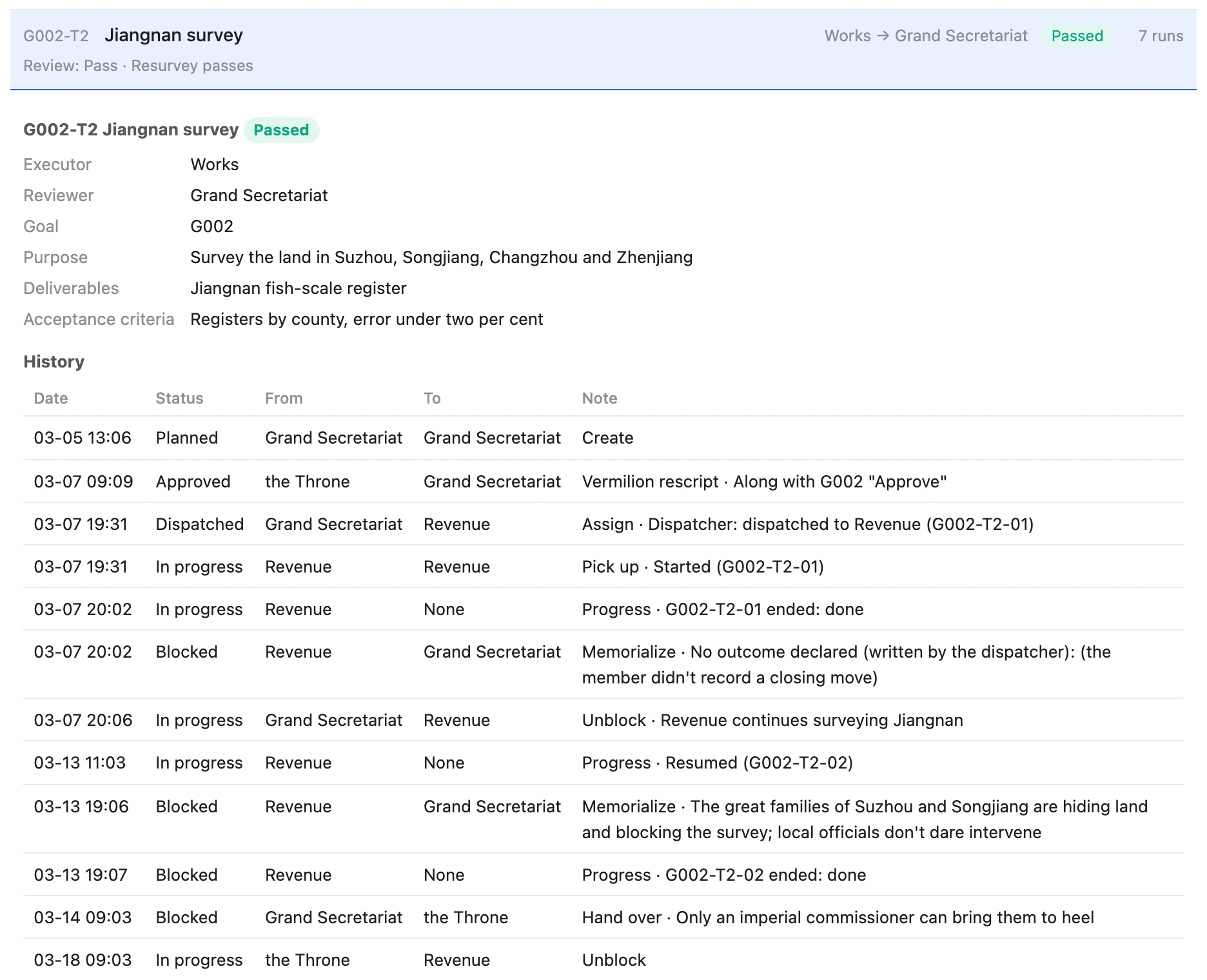
Every task card has its full history: Chapter 7 task card

Every task card has its full history

Purpose, deliverables and acceptance criteria live on the card. Who dispatched it, who took it, when it got blocked, why it went up, which session was resumed: each step is a row in the history. This Jiangnan land survey was dispatched seven times and memorialized twice before it finally passed.

Chapter 7 · task card →
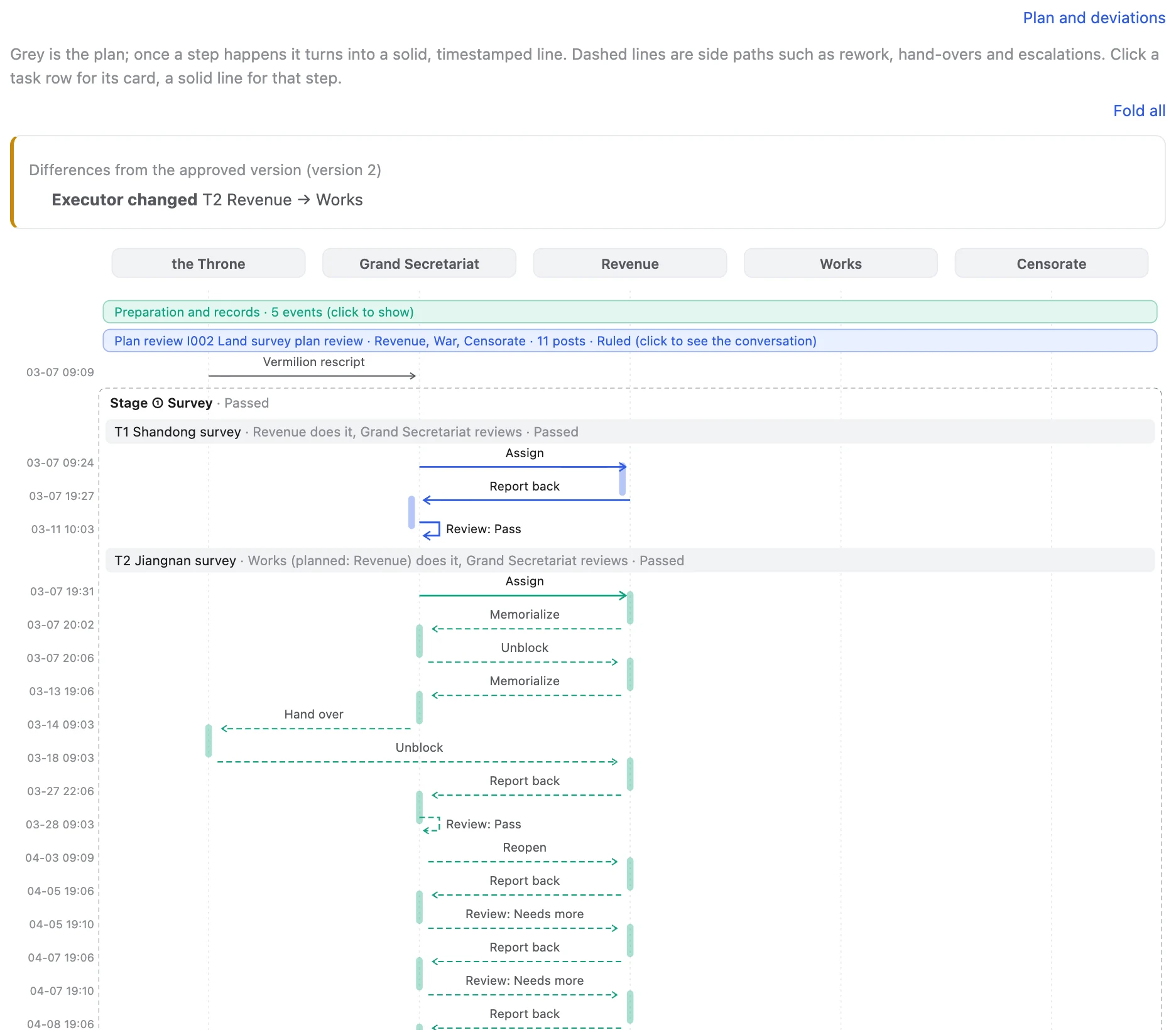
Sequence diagram: plans turn into solid lines: Chapter 7 flow chart

Sequence diagram: plans become solid lines, with every rework on it

Grey is the plan; when something happens it turns into a solid, timestamped line. Dashed lines are escalations, hand-ups and rework. When evidence overturns a premise the goal is reopened and later stages fall away; Revenue fails twice more, hits the rework limit, and the Secretariat reassigns the job to Works.

Chapter 7 · flow chart →
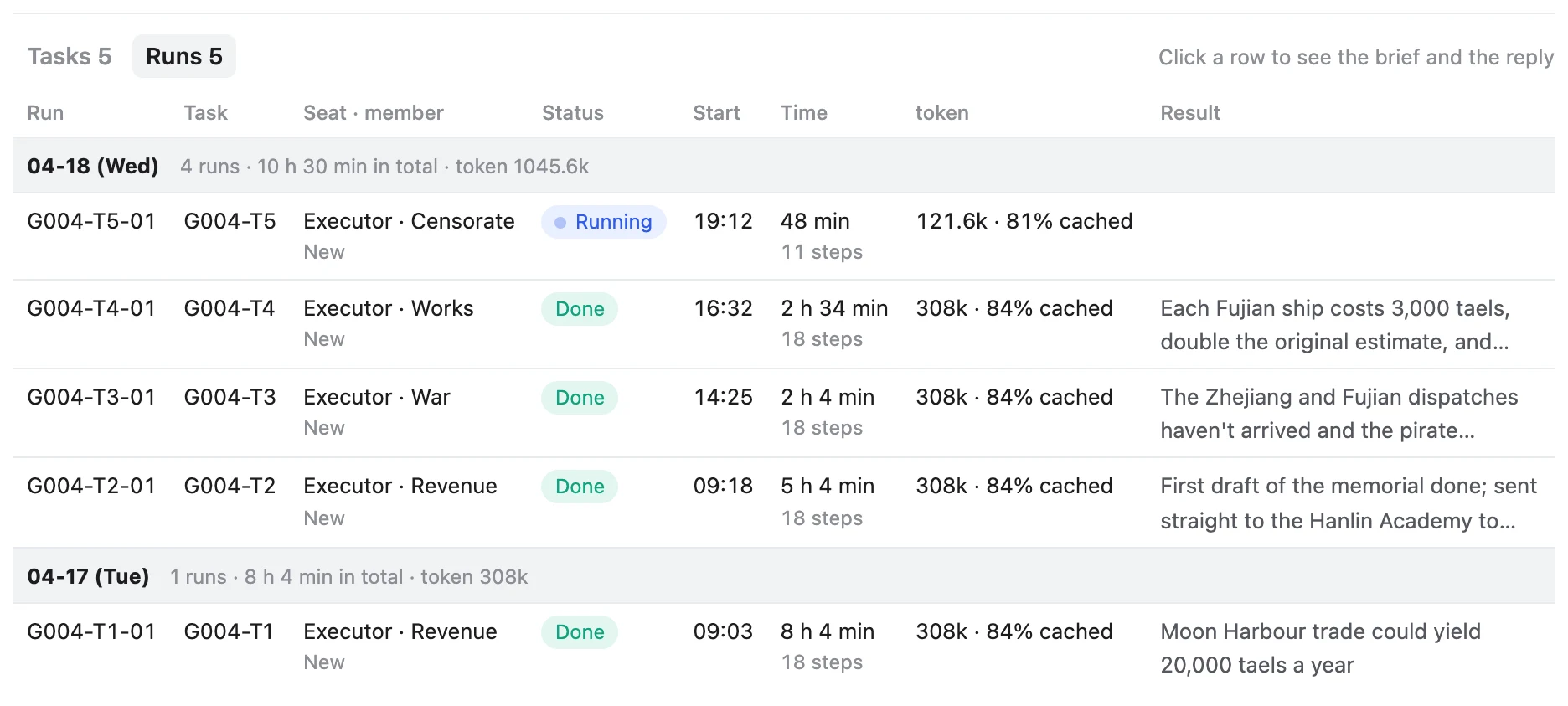
Every run: time, steps, tokens: final chapter run log

Every run: time, steps, tokens

The dispatch script starts members, resumes sessions and keeps the books: which run is going, how long it's taken, tokens spent, cache hits, and the one line it reported back, totalled by day.

Final chapter · runs →
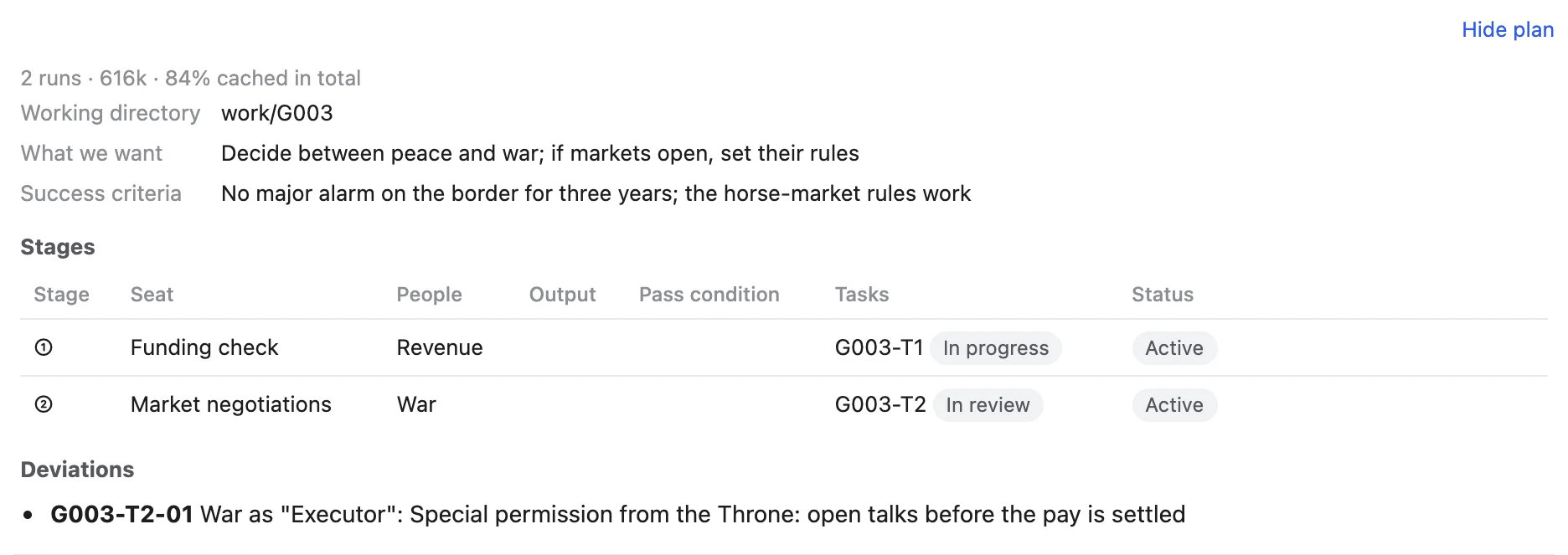
You can step outside the process, but it leaves a trace: Chapter 5 plan and deviations

You can step outside the process, but it leaves a trace

In special cases the order can be overridden, but a reason must be given; the board marks it as a deviation and the plan keeps a record. Starting work without approval is the one rule nobody can override.

Chapter 5 · plan and deviations →
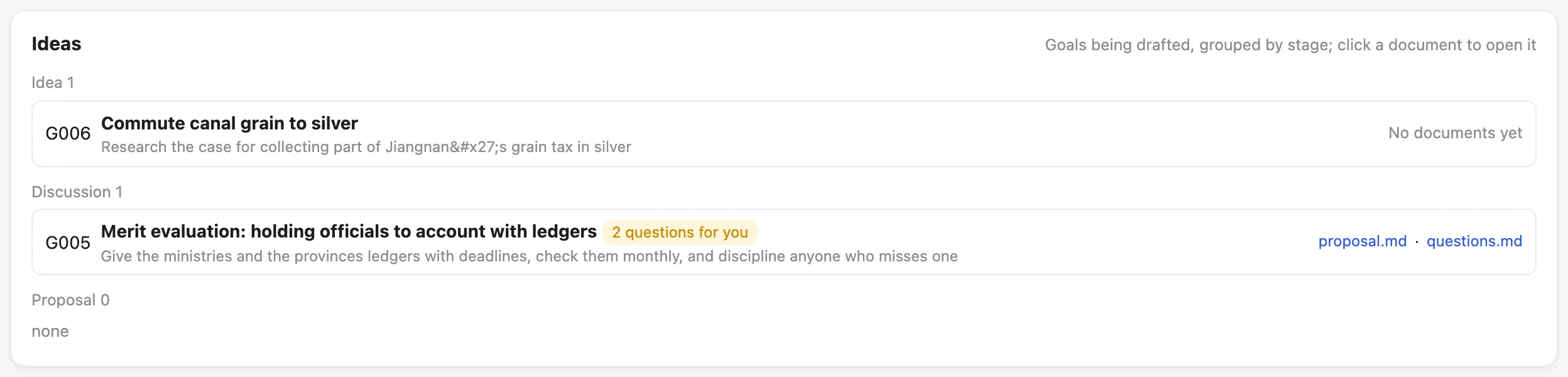
Every idea gets a card first: final chapter ideas page

Every idea gets a card first

Mention a new reform in passing and the Lead opens a card for it. Drafts live on the "Ideas" page, grouped by idea, discussion and proposal, with open questions for you visible at a glance. They don't take up an active slot.

Final chapter · ideas →

The rules are enforced by code, not by AI good behaviour

  • One way to write: every state change goes through flow.py, which checks order, staffing, dependencies and approval, refuses anything out of line on the spot, and lists the moves that are allowed.
  • Checked before dispatch: if validation fails or a hand-off is missing, the dispatch script won't send the work.
  • Checked after every turn: Claude Code runs validation at the end of each turn and won't let the turn end with errors. It has to fill in what's missing, not delete content or invent an approval.
  • Just local files: your project gains a collab/ folder of Markdown and JSON, managed by git. No database, account or cloud service.
flow.py
$ flow.py log G006-T1 dispatch --to Revenue --override "urgent"
hard error: G006-T1 is still planned: work starts once goal G006 is approved. This can't be overridden

$ flow.py log G004-T3 dispatch --to War
rule error: G004-T3 is "Blocked" and can't take "Dispatch" (only from Approved)
If the Lead or Owner really needs this, add --override "reason"; the board will mark it as a deviation.

Also: decisions get their own register, and meeting rulings are recorded automatically. Finished goals move to the archive page, with their diagrams and history intact. An optional NOW board puts several projects and your schedule on one page. Members all work in their own CLIs (Claude Code, Codex CLI and others), with files, terminal and search as usual.

07Demo

The Wanli Reforms: an eight-chapter demo

Nothing to install. The demo is set in 1573, the first year of the Wanli Emperor, and you are the Emperor. Each chapter is the real board of one project stopped at a moment in the story, and every event goes through the toolkit's real write path.

Start from the chapter list →

08Vision

The next way of working with AI

Today we chat with AI one message at a time. What we want: you talk to one Lead about what you want, and it organizes the people, drives the work and delivers.

1

Goals as the unit; you stay at the top

Every project starts from goals. With the Lead you discuss what you want, the success criteria and the trade-offs, then review the delivery and sign off. Breaking down tasks, staffing, tracking and rework are the Lead's job.

2

A talent market: proven setups as specialists

A setup that you or others have used and proven again and again, covering persona, skills, MCP tools, permission limits, strengths, tier and cost, and track record, packaged as a "specialist" that can be shared and reused.

3

The Lead assembles a team per goal

Once a goal is set, the Lead picks suitable specialists from the market to form a team for it: strong ones for hard work, cheap ones for chores, plus a critical reviewer. When the work is done the team disbands, and good specialists earn a reputation.

Where it stands: the main line of goals, tasks, approval, dispatch, review and meetings already works (it's the demo above). Team configuration works, and the board has an early talent market, still on sample data. Packaging, sharing and reputation for specialists come next.

09Get started

Get started

You need Python 3 (standard library only) and git. It currently runs on macOS.

Try the demo locally

git clone https://github.com/zhanghongyang857-dot/collab.git
cd collab
python3 demo/build.py --lang en
python3 src/board/server.py --port 3101 --project demo/wanli-reforms

Open http://127.0.0.1:3101. On the local board you can really approve and speak in meetings.

Use it on your own project

  1. Publish the toolkit: publish src/ as a standalone copy; the board runs in the background.
  2. Install the workbench in English: init.sh new --lang en adds an AGENTS.md and a collab/ folder to your project.
  3. Open the board: see the project in your browser, and have the Lead open your first goal from PROGRESS.md.

Exact commands are in src/README.md.

10FAQ

FAQ

Which models does it support?

The Lead is usually Claude (Claude Code or the desktop app). Members can be Codex CLI, DeepSeek, the Claude CLI, or any assistant that runs in a terminal. Members work in their own native CLI; Vermilion doesn't replace them.

Where is my data? Is anything uploaded?

Everything lives in your project's collab/ and work/ folders as Markdown and JSON, and the board runs on your machine. Vermilion itself uploads nothing; the models go online however their own tools do.

What does it cost?

Vermilion is free and open source (MIT). The cost is the models you use: the board records tokens and cache hits for every run, and the Lead picks members by difficulty and price, giving chores to cheaper models.

How is this different from a multi-agent framework?

Multi-agent frameworks orchestrate agents talking to each other in code. Vermilion doesn't write agents or script conversations. It manages the project ledger, the flow, approvals and sign-off, and the agents are the CLI tools you already have.

How is this different from an AI group chat?

A group chat puts several models in one conversation, so the context is one ever-longer transcript. Vermilion isn't a group chat: the project lives in the ledger, each member gets a slice of context for their seat and works in their own CLI, and conclusions are written back to the ledger. When you want a discussion, you call a meeting: each model speaks independently and you rule.

Which languages does it support?

English and Chinese. You choose when you install the workbench in a project (--lang en or --lang zh); protocol, templates and messages follow that choice. File names and codes underneath are English for both. The board has its own 中 / EN switch for the interface.

Which operating systems?

So far it has only been used on macOS. It needs Python 3 (standard library only) and git.

Should I use it for small things?

No. For a one-off question, just chat. Vermilion suits work that runs for days or weeks, moves in stages, and benefits from models checking each other.

Is the demo real?

The demo data is fictional: nothing was dispatched and no model was called. But every event goes through the toolkit's real write path and the same rule checks, and the demo doubles as the toolkit's largest regression test.

Early version: interfaces and file formats will still change, and a single collab command is in progress. MIT licence.

This is still a demo

Vermilion is an early version and needs more work before it fully delivers on the ideas above. Share your own "team": which models you use, how you split the work, which specialist works best. Ideas for improvement and complaints are welcome too.

Write to me: hongyang003@e.ntu.edu.sg

Watch one chapter, then decide